We’ve talked about how content gets structured, templated, and rendered. But there’s a parallel story
running through every AEM implementation that rarely gets the strategic attention it deserves: the
assets. This post is about fixing that.
A campaign manager needs a product hero image for a new landing page. She checks the DAM, finds twelve
versions of what might be the right image — labelled FINAL, FINAL_v2, FINAL_ACTUALLY_USE_THIS. She
downloads three, sends them to a designer in Teams. The designer uploads the right one back to a different
folder. Twelve people now have local copies. One of them is an uncropped version with a watermark that
someone missed.
This isn’t a technology problem. It’s a governance, metadata, and workflow problem that AEM Assets can
solve — if implemented with intent.
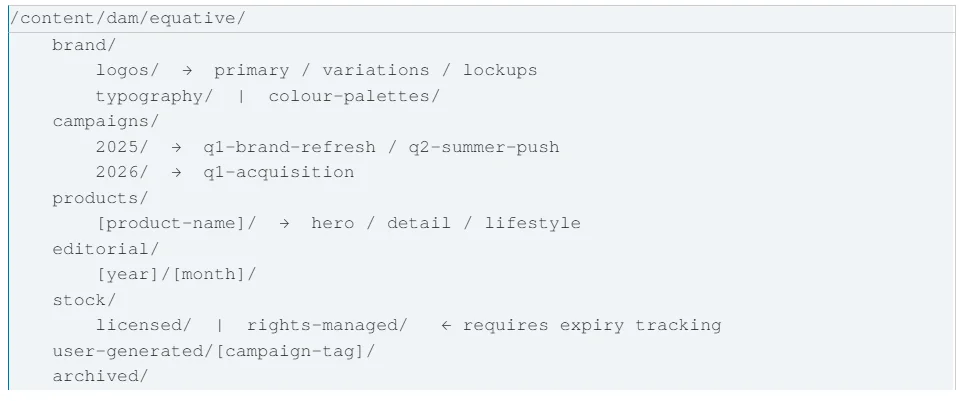
The Equative Recommended Folder Taxonomy
The top-level split mirrors how different teams think about assets, not how they’re technically stored. The
year/quarter hierarchy in campaigns/ enables time-based bulk operations: archiving, reporting, and rights
expiry sweeps become a folder-level operation. archived/ is not a bin — it’s a permanent reference layer.
Assets should never be deleted if they appeared on a live page.
Assign different schemas to different folders under Tools → Assets → Metadata Schemas:
Metadata is only as good as your team’s willingness to enter it. If your schema requires 14 mandatory fields to
upload a single image, compliance will be zero within a month.
The Tiered Metadata Model
The key principle: Tier 1 blocks publication. Tier 2 warns. Tier 3 enriches. Friction at upload = assets going
rogue into personal drives.
Smart Tags: Your Metadata Accelerator
AEM Assets’ Smart Tagging service (powered by Adobe Sensei) automatically generates keyword tags from
image content. For Equative-specific product terminology, train a Custom Smart Tags model under Tools →
Assets → Smart Tags Training. Minimum 25-30 tagged images per concept. Training runs as a background
workflow; subsequent uploads get auto-tagged within minutes.
Practical result: an asset uploaded as hero_final_v3_USE_THIS.jpg gets automatically tagged with [product-x],
[lifestyle], [outdoor], [summer], [mobile-optimised] based on visual content. Search becomes finding rather
than hunting.
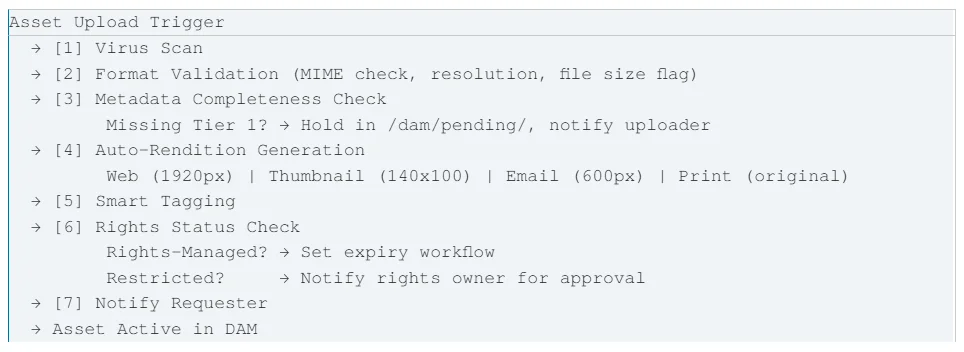
The Asset Ingestion Workflow
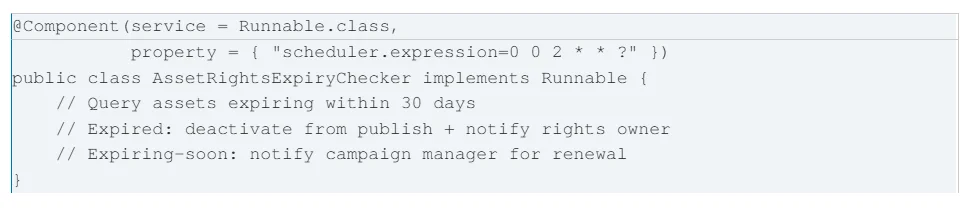
Rights Expiry Workflow: The One That Saves Legal
Set up a scheduled workflow running nightly at 2 AM that queries for assets expiring within 30 days. For
expired assets: deactivate from publish + notify rights owner. For expiring-soon: notify campaign manager for
renewal. Paired with a rights owner field in your metadata schema, this keeps your pages legally clean and
your legal team off your back.
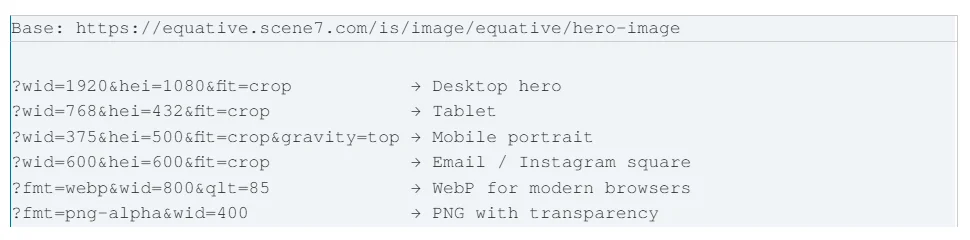
The Scene7 URL Parameter Model
A single master asset in the DAM becomes every variant you need via URL parameters — no separate files
required:
Smart Crop: The Author Experience Win
Smart Crop (powered by Sensei) automatically detects focal points and generates crops that preserve them.
Configure under Tools → Assets → Image Profiles:
Apply this profile to your campaigns/ and products/ folders. Every image uploaded gets Smart Crop renditions
automatically. Authors stop needing to upload 4 crops of every image. Asset production time drops, the DAM
stops filling up with derivative files.
Brand Portal lets non-AEM users (agency partners, regional offices, freelancers) access pre-approved assets
without an AEM author login. The approval workflow: campaign manager requests Brand Portal publication →
brand owner reviews (1 business day SLA) → asset published with expiry date and permitted-use guidelines
attached.
For campaigns, bundle the full asset package as a Collection: hero images, product shots, copy docs, brand
guidelines. Share the Collection link with agency partners. Partners download what they need. No email
chains with zip files. No ‘can you resend the logo in PNG?’ Slack messages at 11pm.
Rights & Compliance Metrics
The Quarterly DAM Audit Content Velocity Metrics
The DAM audit isn’t a cleanup exercise — it’s a strategic review of your content investment. Done quarterly, it
takes half a day. Done annually after years of drift, it takes months.
Next in the series: AEM as a Cloud Service — Migration Patterns and Gotchas. The journey from AEM 6.5 on-
premise to AEMaaCS, with attention to content migration tooling, the custom code compatibility analyser, and
the operational model changes that catch teams off guard.
#AEM #DAM #DigitalAssetManagement #DynamicMedia #BrandPortal #SmartTags #AssetGovernance #EquativeSolutions