Every enrollment, application, and claim tells the same story: a business needs data from a customer, and the
form is the bridge between them. When that bridge is clunky, customers abandon it. When it’s seamless, it
becomes a competitive advantage. Adobe Experience Manager (AEM) Forms exists to make that bridge
strong — turning what used to be static paperwork into dynamic, connected experiences that adapt to the
person filling them out.
Marketing teams have spent years perfecting the front half of the customer journey — personalized content,
targeted campaigns, polished landing pages. But the moment a prospect has to actually do something — apply
for a loan, enroll in a benefits plan, file a claim — that carefully built momentum often collides with a long,
rigid form. It’s frequently the single biggest point of friction in an otherwise modern digital experience, and
it’s where high-intent customers are most likely to drop off.
AEM Forms is built to close that gap, treating the form itself as a first-class part of the customer experience
rather than an afterthought bolted onto the end of it.
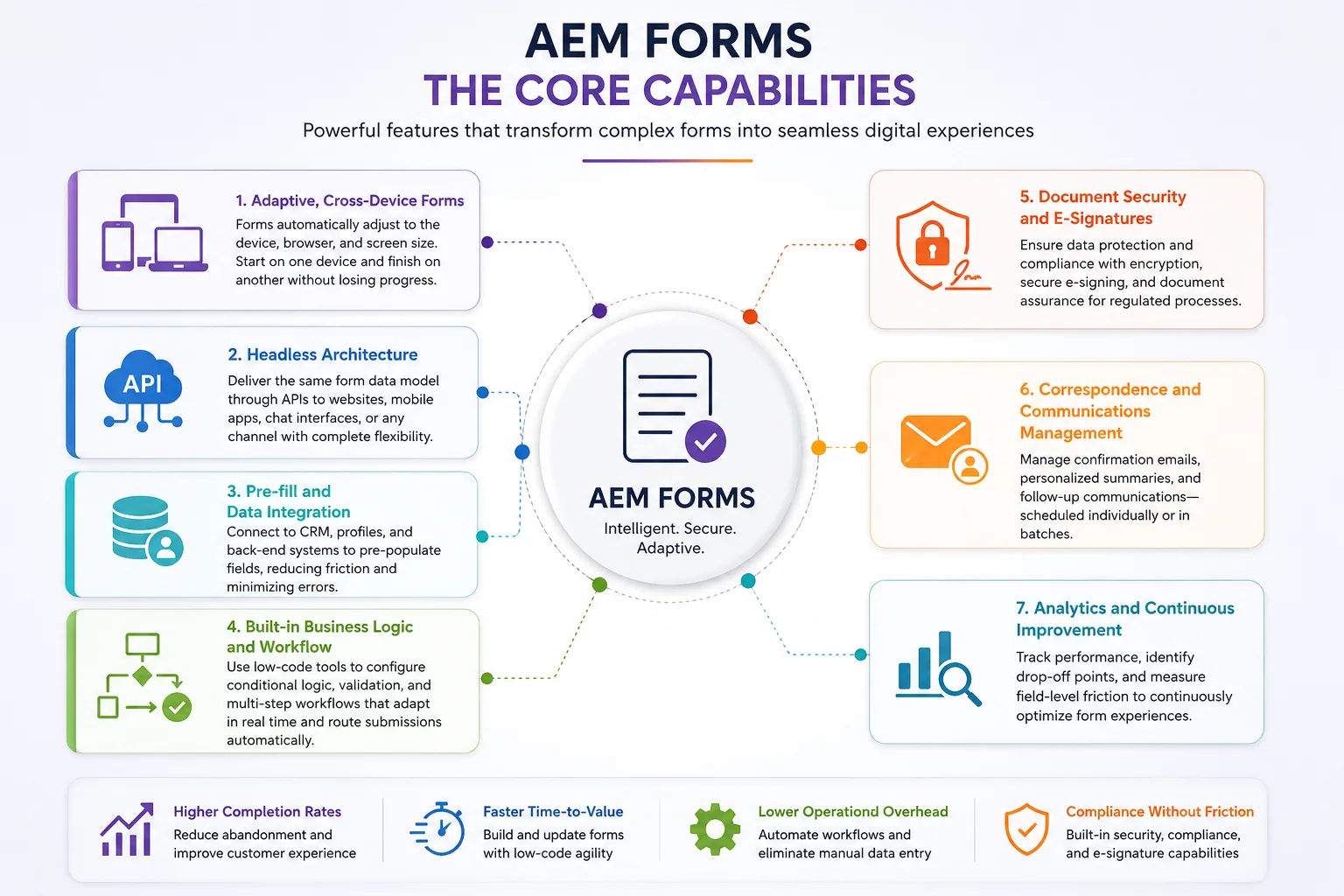
AEM Forms doesn’t operate in isolation. It’s designed to plug into the wider Adobe Experience Platform
ecosystem — Journey Optimizer for orchestrating next steps, Experience Platform for enriching customer
profiles with form response data in real time, and Adobe Sign for e-signature workflows. That connectivity
means a form isn’t just a data-collection endpoint; it’s a feedback loop that updates the customer profile and
informs the next interaction, whether that’s a follow-up email, a personalized offer, or a service call.
Adobe’s more recent direction for AEM Forms leans heavily into agentic AI, aimed at three friction points in
particular: how fast forms can be built, how discoverable they are, and how adaptive the completion
experience feels.
On the creation side, teams can generate or update a form from a brief or an image with a simple prompt, with
the system recommending approved templates and matching page styling automatically — reducing how
much IT involvement is needed for what used to be a developer-heavy task.
On the discovery side, forms are increasingly optimized not just for traditional search and human navigation,
but for how AI agents surface and interact with them — a nod to a future where some customer journeys may
be partially navigated by AI assistants on the customer’s behalf.
On the completion side, forms increasingly adapt based on audience segments and behavioral triggers pulled
from the customer’s profile, so two people never necessarily see the same version of a form — each gets the
version most relevant to their intent and history.
For an organization running high-stakes enrollment or application processes — a healthcare provider
onboarding patients, an insurer processing claims, a bank opening accounts — the practical payoff of AEM
Forms comes down to a few things:
The through-line across all of it is simple: forms shouldn’t be the place where a good digital experience falls
apart. AEM Forms is Adobe’s answer to making sure the last, most consequential step of a customer journey
feels as considered as the first.
Sources: Adobe Experience Manager Forms product documentation and Adobe Experience League, current as of mid-2026.